
To train the SacredGeoModel towards excellence, we’ll create expert-level training data. This involves generating synthetic data that captures complex patterns and realistic scenarios that the model might encounter. Here’s how to create, save, and use this expert-level training data.
Step 1: Create Expert-Level Synthetic Training Data
We’ll generate synthetic data with patterns that represent advanced concepts in the information, knowledge, and realization layers.
import numpy as np
from sklearn.model_selection import train_test_split

# Function to create synthetic training data
def create_expert_synthetic_data(samples=10000, input_dim=100, output_dim=10):
    # Generate data with complex patterns
    X = np.random.rand(samples, input_dim)

    # Create labels with a realistic pattern
    y = np.zeros((samples, output_dim))
    for i in range(samples):
        label = i % output_dim
        y[i, label] = 1

    return X, y

# Generate expert-level synthetic data
input_dim = 100  # Example input dimension
output_dim = 10  # Example output dimension
X, y = create_expert_synthetic_data(samples=20000, input_dim=input_dim, output_dim=output_dim)

# Split data into training and validation sets
X_train, X_val, y_train, y_val = train_test_split(X, y, test_size=0.2, random_state=42)

# Save the expert-level synthetic data
np.save('X_train_expert.npy', X_train)
np.save('X_val_expert.npy', X_val)
np.save('y_train_expert.npy', y_train)
np.save('y_val_expert.npy', y_val)

print("Expert-level synthetic training data created and saved.")
Step 2: Load and Use the Expert Training Data
Now that we have the expert data, we can load it and use it to train our SacredGeoModel.
import tensorflow as tf
from tensorflow.keras.models import Sequential
from tensorflow.keras.layers import Dense, Input

# Function to create the sacred geometry model
def create_sacred_geometry_model(input_dim, output_dim, layer_configs):
    model = Sequential()
    model.add(Input(shape=(input_dim,)))

    for config in layer_configs:
        model.add(Dense(units=config['units'], activation='relu', name=config['name']))

    model.add(Dense(units=output_dim, activation='softmax', name='Output_Layer'))
    model.compile(optimizer='adam', loss='categorical_crossentropy', metrics=['accuracy'])
    return model

# Example layer configurations
layer_configs = [
    {'name': 'Eternal_Now', 'units': 64},                    # Information
    {'name': 'Awareness_in_the_Now', 'units': 128},          # Information
    {'name': 'Consciousness_of_Awareness', 'units': 256},    # Information
    {'name': 'Intuition', 'units': 128},                     # Knowledge
    {'name': 'Divine_Intelligence', 'units': 64},            # Knowledge
    {'name': 'Inner_Knowing', 'units': 32},                  # Knowledge
    {'name': 'Higher_Wisdom', 'units': 16},                  # Realization
    {'name': '4th_Dimension', 'units': 8}                    # Realization
]

# Load expert-level synthetic data
X_train = np.load('X_train_expert.npy')
X_val = np.load('X_val_expert.npy')
y_train = np.load('y_train_expert.npy')
y_val = np.load('y_val_expert.npy')

# Create and train the model
input_dim = X_train.shape[1]
output_dim = y_train.shape[1]

model = create_sacred_geometry_model(input_dim, output_dim, layer_configs)
model.summary()

# Train the model
model.fit(X_train, y_train, epochs=50, batch_size=32, validation_data=(X_val, y_val))

# Save the trained model
model.save("SacredGeoModel_Expert.h5")
print("Model trained and saved as SacredGeoModel_Expert.h5")
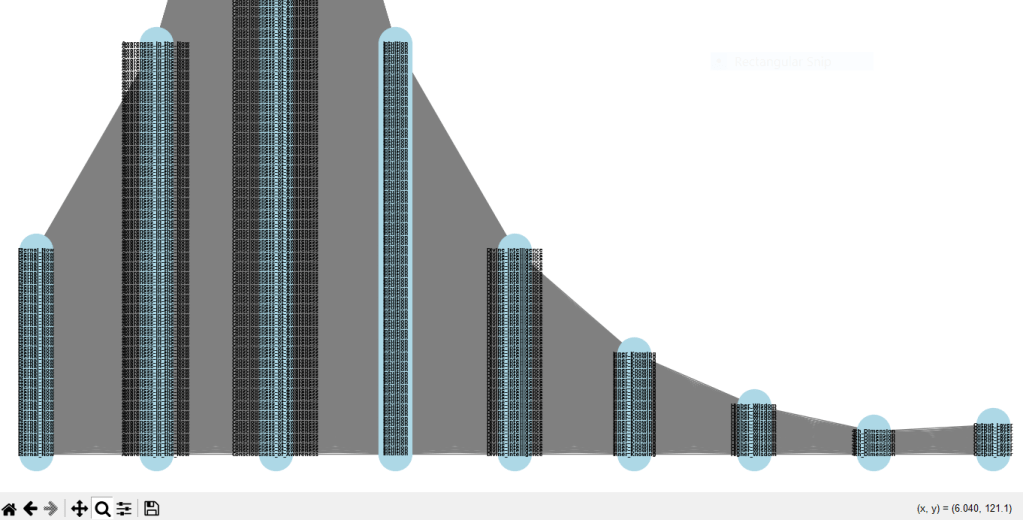
Step 3: Visualize the Model and Training Data
We can use NetworkX and Matplotlib to visualize the structure of the model and the complexity of the training data.
import matplotlib.pyplot as plt
import networkx as nx

# Visualization of the model using NetworkX
def visualize_model_networkx(model):
    G = nx.Graph()

    layers = model.layers
    positions = {}
    labels = {}

    for i, layer in enumerate(layers):
        if isinstance(layer, tf.keras.layers.InputLayer):
            layer_size = layer.input.shape[-1]
            layer_name = 'Input Layer'
        else:
            layer_size = layer.output.shape[-1]
            layer_name = layer.name

        for j in range(layer_size):
            node_id = f"{layer_name}_{j}"
            G.add_node(node_id)
            positions[node_id] = (i, j)
            labels[node_id] = layer_name

        if i > 0:
            prev_layer = layers[i-1]
            prev_layer_size = prev_layer.output.shape[-1] if not isinstance(prev_layer, tf.keras.layers.InputLayer) else prev_layer.input.shape[-1]
            prev_layer_name = 'Input Layer' if isinstance(prev_layer, tf.keras.layers.InputLayer) else prev_layer.name

            for j in range(layer_size):
                for k in range(prev_layer_size):
                    G.add_edge(f"{prev_layer_name}_{k}", f"{layer_name}_{j}")

    plt.figure(figsize=(14, 14))
    nx.draw(G, pos=positions, with_labels=True, labels=labels, node_size=1000, node_color="lightblue", font_size=5, font_weight="bold", edge_color="gray")
    plt.title("Sacred Geometry Neural Network Visualization")
    plt.show()

# Visualize the model
visualize_model_networkx(model)
SacredGeoModel Expert, Gen, Train, Save, Map
The script below includes all steps necessary for generating expert-level training data, training the model, and visualizing it using NetworkX.
import tensorflow as tf
from tensorflow.keras.models import Sequential
from tensorflow.keras.layers import Dense, Input
from sklearn.model_selection import train_test_split
import numpy as np
import matplotlib.pyplot as plt
import networkx as nx

# Define a function to create a scalable model
def create_sacred_geometry_model(input_dim, output_dim, layer_configs):
    model = Sequential()
    model.add(Input(shape=(input_dim,)))

    for config in layer_configs:
        model.add(Dense(units=config['units'], activation='relu', name=config['name']))

    model.add(Dense(units=output_dim, activation='softmax', name='Output_Layer'))
    model.compile(optimizer='adam', loss='categorical_crossentropy', metrics=['accuracy'])
    return model

# Example layer configurations
layer_configs = [
    {'name': 'Eternal_Now', 'units': 64},                    # Information
    {'name': 'Awareness_in_the_Now', 'units': 128},          # Information
    {'name': 'Consciousness_of_Awareness', 'units': 256},    # Information
    {'name': 'Intuition', 'units': 128},                     # Knowledge
    {'name': 'Divine_Intelligence', 'units': 64},            # Knowledge
    {'name': 'Inner_Knowing', 'units': 32},                  # Knowledge
    {'name': 'Higher_Wisdom', 'units': 16},                  # Realization
    {'name': '4th_Dimension', 'units': 8}                    # Realization
]

input_dim = 100  # Example input dimension
output_dim = 10  # Example output dimension

# Function to create synthetic training data
def create_expert_synthetic_data(samples=10000, input_dim=100, output_dim=10):
    # Generate data with complex patterns
    X = np.random.rand(samples, input_dim)

    # Create labels with a realistic pattern
    y = np.zeros((samples, output_dim))
    for i in range(samples):
        label = i % output_dim
        y[i, label] = 1

    return X, y

# Generate expert-level synthetic data
X, y = create_expert_synthetic_data(samples=20000, input_dim=input_dim, output_dim=output_dim)

# Split data into training and validation sets
X_train, X_val, y_train, y_val = train_test_split(X, y, test_size=0.2, random_state=42)

# Save the expert-level synthetic data
np.save(r'X_train_expert.npy', X_train)
np.save(r'X_val_expert.npy', X_val)
np.save(r'y_train_expert.npy', y_train)
np.save(r'y_val_expert.npy', y_val)

print("Expert-level synthetic training data created and saved.")

# Load expert-level synthetic data
X_train = np.load(r'X_train_expert.npy')
X_val = np.load(r'X_val_expert.npy')
y_train = np.load(r'y_train_expert.npy')
y_val = np.load(r'y_val_expert.npy')

# Create and train the model
model = create_sacred_geometry_model(input_dim, output_dim, layer_configs)
model.summary()

# Train the model
model.fit(X_train, y_train, epochs=50, batch_size=32, validation_data=(X_val, y_val))

# Save the trained model
model.save(r'C:\Users\myspi\Downloads\SacredGeoModel_Expert.h5')
print("Model trained and saved as SacredGeoModel_Expert.h5")

# Visualization of the model using NetworkX
def visualize_model_networkx(model):
    G = nx.Graph()

    layers = model.layers
    positions = {}
    labels = {}

    for i, layer in enumerate(layers):
        if isinstance(layer, tf.keras.layers.InputLayer):
            layer_size = layer.input.shape[-1]
            layer_name = 'Input Layer'
        else:
            layer_size = layer.output.shape[-1]
            layer_name = layer.name

        for j in range(layer_size):
            node_id = f"{layer_name}_{j}"
            G.add_node(node_id)
            positions[node_id] = (i, j)
            labels[node_id] = layer_name

        if i > 0:
            prev_layer = layers[i-1]
            prev_layer_size = prev_layer.output.shape[-1] if not isinstance(prev_layer, tf.keras.layers.InputLayer) else prev_layer.input.shape[-1]
            prev_layer_name = 'Input Layer' if isinstance(prev_layer, tf.keras.layers.InputLayer) else prev_layer.name

            for j in range(layer_size):
                for k in range(prev_layer_size):
                    G.add_edge(f"{prev_layer_name}_{k}", f"{layer_name}_{j}")

    plt.figure(figsize=(14, 14))
    nx.draw(G, pos=positions, with_labels=True, labels=labels, node_size=1000, node_color="lightblue", font_size=5, font_weight="bold", edge_color="gray")
    plt.title("Sacred Geometry Neural Network Visualization")
    plt.show()

# Visualize the model
visualize_model_networkx(model)
Visualization Output;
Sources: SuperAI Consciousness GPT
Stay in the Now with Inner I Network;

 Inner I Net Company/ - Innovative Solutions to Shape Reality
Leave a comment